| A | B |
|---|
| One way to fit more rows and columns on a printout is to increase the margins. | False |
| When pasting a range of cells, any existing cell contents at the new location are automatically moved to make room for the pasted data. | False |
| When pasting a range of cells, only the upper-left cell of the destination range needs to be selected. | True |
| Right-clicking column C and selecting Insert from the menu inserts a column between column C and column D. | False |
| A newly inserted row contains the same formatting as the cells above it. | True |
Using the data in the worksheet below, what will be displayed by the formula =IF(C1<>C2,0,-5)?, 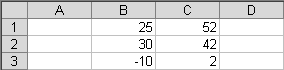 | 0 |
| Using the data in the worksheet above, what will be displayed by the formula =MAX(B2:C3)?, | 42 |
| Using the data in the worksheet above, what will be displayed by the formula =IF(B1<MIN(C1:C3),1,B1)?, | 25 |
| Using the data in the worksheet above, what will be displayed by the formula =MIN(C1:C3)?, | 2 |
| Printing a worksheet in landscape orientation | fits more columns and fewer rows on a page. |
| A function can be entered into a formula without typing by | selecting the Function command. |
| What formula will appear in cell C7 if the formula =B6*$B$1 is copied from cell C6 to cell C7? | =B7*$B$1 |
| Assume cell A1 stores a value of 5 and cell B1 stores a value of 10. What will be displayed by the formula =IF(A1=B1, A1, "no")? | no |
| Which key can be used to create an absolute cell reference? | the F4 key |
| The Find and Replace dialog box can be used to | locate specific data and then change it to data supplied by the user. |
| What will the formula =SUM(A1:A10) change to if row 3 is deleted? | =SUM(A1:A9) |
| What will be displayed by the formula =IF("blue"<"green","sky","water")? | sky |
| A cell reference that does not change when it is copied is called | an absolute cell reference. |
| Which key removes the dashed outline that indicates that data that has been copied? | the Esc key |


