WELCOME TO 6TH GRADE COMPUTERS
WEEKLY SCHEDULE OF ACTIVITIES:
WEEK 1
1. Begin Computer Basic Unit: Computing System and the components of a computer. Refer to the website TechTerms.com or Webopedia.com for detailed explanations of common computer terms.
2. Week 1 Vocabulary on hardware devices. Practice review games are available below.
QUIZ: Week 1 Vocabulary Quiz on Fridays or Monday.
ACTIVITIES:
Tech Terms Computer Dictionary
http://www.techterms.com/
Webopedia Computer Dictionary
http://webopedia.com/
The Journey Inside by Intel
http://www97.intel.com/discover/JourneyInside/TJI_Curriculum/default.aspx
_________________________________________________________________________
WEEK 2
1. Continue Computer Basic Unit: Computing System and the components of a computer.
2. Input devices, Storage Devices and the Central Processing Unit
WEBSITES found under the USEFUL LINKS section at the bottom of this page:
The Journey Inside
Input Device Terms
Storage Device Terms
System Unit Terms (Active Storage and Processor)
3. Week 2 Vocabulary on software and window tools. Practice review games are available below.
QUIZ: Week 2 Vocabulary Quiz on Friday and Monday.
REVIEW PRACTICE ACTIVITIES
Software/Windows Tools Flash Cards
http://www.quia.com/jg/1421192.html
Software/Windows Tools Hangman
http://www.quia.com/hm/432501.html
ACTIVITIES:
Computer Basics Battleship
http://www.quia.com/ba/195948.html
Hardware Challenge
http://www.quia.com/cb/296155.html
_________________________________________________________________________
WEEK 3
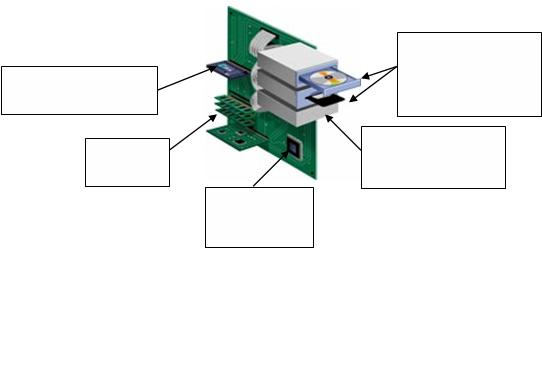
1. Complete Computer Basic Unit: Computing System and the components of a computer.
a. Continue the Central Processing Unit and Output Devices
b. Review the four components of the Computer: Input, Storage, Process and Output

WEBSITES found under the USEFUL LINKS section at the bottom of this page:
Output Device Terms
Click-N-Learn Computer Hardware
http://www.kids-online.net/learn/clicknov/clicknov.html
2. FINAL on Computer Basics
REVIEW PRACTICE ACTIVITIES
Hardware Quiz
Hardware Devices Quiz (under MY ACTIVITIES below)
Computer Parts: Jumbled Words
Computer Basics Battleship
Hardware Challenge
3. Introduce the Home Row Keys and other keyboarding techniques in Mavis Beacon software. Learned to create paragraphs using the appropriate keys (Enter Key, Tab Key and Spacebar).
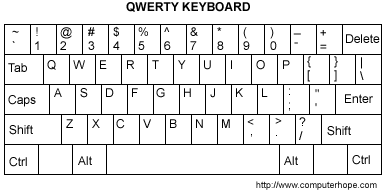
4. Week 3 Vocabulary on the keys used to create a paragraph. Practice review games are available below.
QUIZ: Week 3 Vocabulary Quiz on Friday or Monday.
ACTIVITIES:
Paragraph Keys for Week 3 Vocabulary
http://www.quia.com/jg/1421196.html
Paragraph Keys Hangman
http://www.quia.com/hm/433461.html
_________________________________________________________________________
WEEK 4
1. Week 4 Vocabulary on Word Processing Document Setup. Practice review games are available below.
REVIEW ACTIVITIES:
Document Orientation Hangman
Document Orientation for Week 4 Matching
QUIZ: Week 4 Vocabulary Quiz on Friday or Monday.
2. Continued Word Processing using MS Word. Learn to format documents using:
Typestyles: Bold, Italic and Underline
Choosing a new Font and Point (Font) Size
Aligning text (left, center and right)
ACTIVITIES:
The First Typewriter
Valentine Card
History of Parachuting_6th
_________________________________________________________________________
WEEK 5
1. Week 5 Vocabulary on Editing in Word Processing. Practice review games are available below.
REVIEW ACTIVITIES:
Editing in Word Processing Hangman
Editing in Word Processing for Week 5 Matching
QUIZ: Week 5 Vocabulary Quiz on Friday or Monday.
2. Continue Word Processing using MS Word. Learn to edit documents using:
Cut, copy and paste
Spell check and Thesaurus
Find and Replace
ACTIVITIES:
Origin of the Internet
History of Parachuting2
_________________________________________________________________________
WEEK 6
1. Week 6 Vocabulary on Additional Editing in Word Processing. Practice review games are available below.
REVIEW ACTIVITIES:
Editing2 in Word Processing Hangman
Editing2 in Word Processing for Week 6 Matching
QUIZ: Week 6 Vocabulary Quiz on Friday or Monday
2. Introduce Basic Spreadsheets using MS Excel:
Uses
Parts and Cell Addresses
ACTIVITIES:
US Flag
_________________________________________________________________________
WEEK 7
1. Week 7 Vocabulary on Formatting in Word Processing. Practice review games are available below.
REVIEW ACTIVITIES:
Formatting in Word Processing Hangman
Formatting in Word Processing for Week 6 Matching
QUIZ: Week 7 Vocabulary Quiz on Friday or Monday
2. Continue Basic Spreadsheets by creating and using existing spreadsheets:
Formatting columns and rows
Formatting cells
Entering data into cells
Calculating data using existing spreadsheets
ACTIVITIES:
Gradebook
Bob's Burger Barn_6th
_________________________________________________________________________
WEEK 8
1. Week 8 Vocabulary on Spreadsheets. Practice review games are available below.
REVIEW ACTIVITIES:
Spreadsheet Hangman
Spreadsheet Matching
QUIZ: Week 8 Vocabulary Quiz on Friday or Monday
2. Continue Basic Spreadsheets by creating and using existing spreadsheets:
Using cell referencing to create formulas
Sorting columns of data in ascending and descending order
Inserting functions into cells in existing spreadsheets
ACTIVITIES:
D. Lish Hamburgers
Address Book
_______________________________________
__________________________________
WEEK 9
1. Week 9 Vocabulary on Spreadsheets. Practice review games are available below.
REVIEW ACTIVITIES:
Spreadsheet Hangman
Spreadsheet Matching
QUIZ: Week 9 Vocabulary Quiz on Friday or Monday.
WORD PROCESSING ASSIGNMENTS:
WP Beach
WP History of Parachuting 6th
WP Origin of the Internet


