 |
|
|
Transformation Laptop Survey - EA/FS
|
|
|
- YOUR DETAILS
Please state your full job title:*
|
- Please state your email address:*
|
- Please provide a contact number:*
|
- WHERE YOU WORK
Brand:*
|
- Branch:*
|
- Subsidiary:*
|
- Region:*
|
- Countrywide Division:*
|
- Please state your base location, if different to the Brand and Branch above.
|
- YOUR LAPTOP
Laptop make (e.g. Dell):*
|
- Laptop model (e.g. Latitude E5430):*
|
- If your laptop has a CGI barcode sticker, please provide the reference number:
If this is not applicable to you type 0.
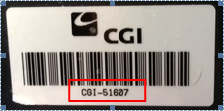 * *
|
- If your laptop has a Service Tag, please provide the detail:
If this is not applicable to you type 0.
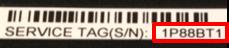 * *
|
- If your Laptop has a Serial Number, please provide the detail:
If this is not applicable to you type 0.
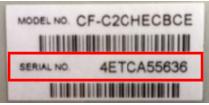 * *
|
- If your laptop does not have any of the above, please provide the Full Computer Name:
(Start > Settings > Control Panel > System > Computer Name tab > Full computer name)
If this is not applicable to you type 0.
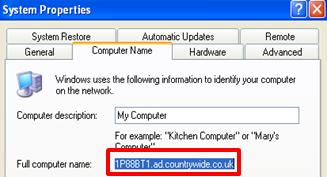 * *
|
- YOUR ADDITIONAL EQUIPMENT
What other equipment do you use that plugs in or connects to your laptop?
Please only state mouse or keyboard if these are WIRELESS and need a dongle/USB to connect to.
*
|
- In order of selection, please provide the make and model of each item selected above (including any additional types that are not mentioned above):
Please separate your answers with a comma.
If this is not applicable to you type 0. *
|
- YOUR APPLICATIONS
Please tick all applications that you currently use:*
|
- Please list any other applications/programs that you use (i.e. MS Project, MS Visio):
If this is not applicable to you type 0.*
|
- If you use Reapit, please select the Reapit database(s) that you access:*
|
- YOUR CONNECTIVITY
Do you use the laptop to work offline (i.e. not connected to the Internet or Countrywide network)?*
|
- How do you connect in Countrywide offices/branches?*
|
- How do you connect at home?*
|
- How do you connect in public places (i.e.hotels, restaurants, coffee shops)?*
|
- If you selected Other as a connection method for questions 22-24 please specify:
If this is not applicable to you type 0.*
|
- If you connect from any other locations, please specify the location and how you connect:
If this is not applicable to you type 0.*
|
- 3G Connections - if you use a 3G connection, which of the following do you use?*
|
- 3G Dongle - if you use a 3G dongle (personal or Countrywide supplied), please provide the make and model:
If this is not applicable to you type 0.*
|
- Do you use a Blackberry?*
|
- YOUR SHARED DATA
Do you access any documents saved in shared folders? *
|
- If yes, please list the folder names:
If this is not applicable to you type 0.*
|
- Do you have access to a team/generic/branch mailbox?*
|
- What is the team/generic/branch mailbox email address?
If this is not applicable to you type 0.*
|
- Do you have access to anyone else’s Inbox?*
|
- If yes, please list the email address for each Inbox:
If this is not applicable to you type 0.*
|
- Does anyone else have access to your Inbox?*
|
- If yes, please list the member(s) of staff AND their email address:
If this is not applicable to you type 0.*
|
- Do you have access to manage anyone else’s Outlook Calendar?*
|
- If yes, please list the member(s) of staff AND their email address:
If this is not applicable to you type 0.*
|
- Does anyone else have access to manage your Outlook Calendar?*
|
- If yes, please list the member(s) of staff and their email address:
If this is not applicable to you type 0.*
|
- Please list any Outlook Public Folders that you currently use:
If this is not applicable to you type 0.
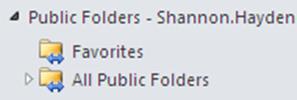 * *
|
- Please list any other shared areas that you work from:
If this is not applicable to you type 0.*
|
- LAPTOP CONDITION
Your laptop might be given to another Countrywide user. In that case, all of your data will be completely removed and the laptop will be re-built, so there would be no risk of personal/confidential data being passed on to a future user of the laptop.
How would you describe the physical condition of your laptop? *
|
- Please tell us, are there any physical faults or issues with your laptop?
(E.g. cracks, damaged screen, missing keys, USB ports not working etc)
If there is nothing wrong with your laptop type None.*
|
- Please detail anything else about your laptop that would potentially stop us from reissuing it to another user:
If there is nothing you want to tell us about your laptop type None.*
|
- If you think there is anything else not covered by this questionnaire that we need to know about your laptop or how you use it, please give us the details or type None.
|
- If you have any outstanding Service Desk calls for this laptop, please type the call reference below. If you have no outstanding Service Desk calls, please type None.
|
