| A | B |
|---|
| Criteria | In the Query Design window, a test that the records in the table must meet to be included in the results. |
| Columnar | A form that displays the values in a record in one column, with each field on a separate line. |
| Data Value | one item of data |
| Database Window | Contains the objects that together make up an Access database |
| Database | A collection of related information organized for rapid search and retrieval. |
| Datasheet View | A view that displays the table data in columns and rows. |
| Datasheet | A form that displays the values in records the same way as they are displayed in Datasheet View or a database table. |
| Design View | A view that displays the field names and what kind of values you can enter in each field. |
| Entry | Entering data into a cell. |
| Field Name | A label to identify a field. |
| Field Properties | Specifications that allow the user to customize the data type settings. |
| Field | A single piece of information in a database. |
| Filter | Allows the user to view and work with a subset of data. Access displays only the data that was chosen to be filtered |
| Find | A command locates specific records or values within a field. |
| Form | Allows you to enter data into a table in a convenient format |
| Layout | The arrangement of data and labels on a report. |
| Navigation Pane | When you open an existing database, the Navigation Pane opens on the left side of the screen. |
| Objects | Access components that make up a database such as tables, forms, queries and reports. |
| Primary Key | A field that identifies each record in a table. |
| Query | Allow user to locate multiple records matching a specified criteria |
| Record | A group of fields in a database. |
| Report | A database object that allows you to organize, summarize and print all or a portion of the data in a database. |
| Sort Ascending/Descending | Creating a list arranged alphabetically or numerically from highest to lowest or lowest to highest |
| Style | Defines how the title and the information in the Detail section are displayed on the report. |
| Table | Stores data in columns and rows |
| Tabular | A form that displays the values in records in row and column format. |
| Tags | precedes objects name with three letters |
| Wizards | Features that lead you step be step through various Access tasks, such as creating tables, forms, queries, and reports. |
 | Background Color |
 | Bold |
 | Datasheet View |
 | Design View |
 | Field |
 | Filter |
 | Font |
 | Font Color |
 | Font Size |
 | Form |
 | Form View |
 | Italic |
 | Layout View |
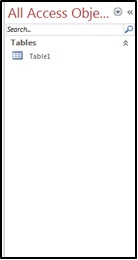 | Navigation Pane |
 | Query Wizard |
 | Report |
 | Sort |
 | Table |
 | Underline |



