| A | B |
|---|
| Which of the following is not included in a template? | Your information |
| Which of the following cannot be used to scroll your publication within a page? | Space bar |
| What is a Margin guide? | Defines the boundary of your printable area |
| What is a grid guide? | Lets you set up a grid to make it easier to design your publication |
| What is a Baseline Guide? | Helps you align text across the columns of a multicolumn publication |
| What is a gutter? | Is an internal margin used to accommodate two page publications |
| This feature lets you arrange elements on your page at any horizontal or vertical position you want. | Ruler Guides |
| How do you know which page is your current page? | Your cursor is on it |
| You can have more than one Master page | True |
| This feature lets you automatically align objects you place close to an object or guide. | Align to |
| In order to move your virtual rulers you click this keyboard key and drag them to your desired location. | Shift |
| When working in publisher, you may want certain objects to appear on all or most of your pages, what is the easiest way to do this with all object types? | Create a Master Page |
| Number 18 is on panel number ___ | 1, 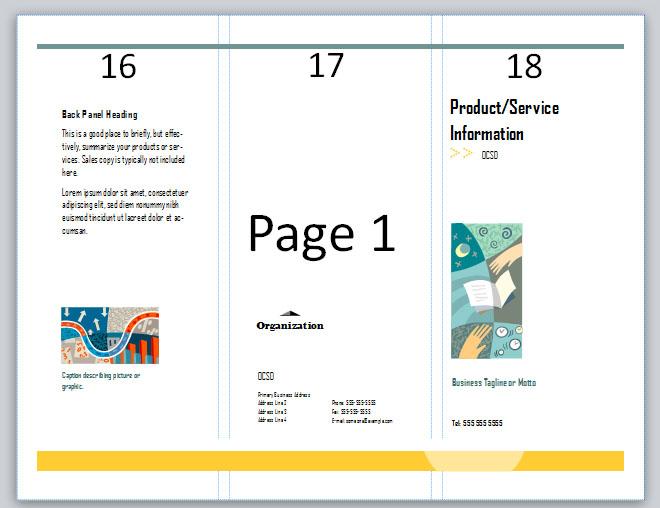 |
| Helps you arrange elements on yourp age at any horizontal or vertical position you want | Ruler Guide |
| Used to measure elements on your page. | Virtual Ruler |
| Lets you set up a grid to make it easier to design your publication | Grid Guide |
| Internal margin used to accomodate two-page publications | Gutter |
| The boundary of your printable area | Margin |
| Number 16 is on panel number ___ | 5, |
| Number 20 is on panel number ___ | 3, 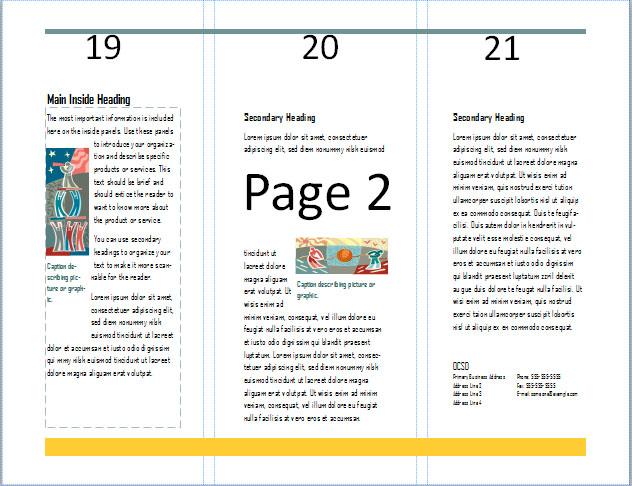 |
| Number 17 is on panel number ___ | 6, |
| Number 19 is on panel number ___ | 2, |
| Number 21 is on panel number ___ | 4, |
| What key do you press on the keyboard to show you all of the keyboard shortcuts on your ribbon in Publisher? | Alt |



