| A | B |
|---|
| 3 modes in which photos can be edited | organize, create, edit |
| tiny square that makes up an image each one with one color | pixel |
| 3 primary colors of the compter world and of light | red, green, blue |
| the 3 color modes in Photoshop Elements | RGB, Grayscale, Bitmap |
| image file format that can maintain transparency | .png |
| lossy format best for compressing photos | .jpg |
| file format, lossless, requires Photoshop Elements to open | .psd |
| file format that can accomodate animated images | .gif |
| increasing the resolution of an image | upsampling |
| reducing the resolution of an image | downsampling |
| A Layer that includes a picture | image layer |
| A layer changes the hue/saturation level on the layer it is applied to | adjustment layer |
| Layer that can be a solid color, gradient or pattern | fill layer |
| First opened image will be labled this | background |
| Combining multiple layers into a single layer | merge layers |
| Combining all layers into a single background | flatten layers |
| Surrounds the contents of a layer with a dotted box with handles | bounding box |
Letter "a" indicates, 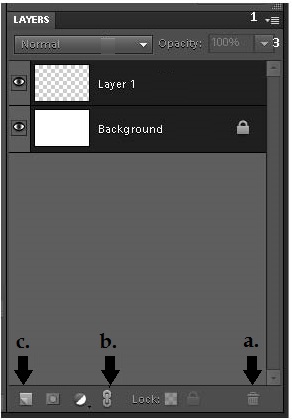 | delete layer |
| Letter "b" indicates, | link layers |
| Letter "c" indicates, | add new layer |
| The number of pixels that make up a picture | Resolution |
| Cropping an image changes the | aspect ratio |
| The difference between light and dark in an image | contrast |
| The gray areas of an image | midtones |
| Things that distract the viewer from the photo's subject | noise |



