| A | B |
|---|
| desktop publishing | Using a software to layout text, type, drawings and images on a page on a personal computer |
| advantage of Publisher over Word | more control over your elements in Publisher |
| publication | A combination of multiple elements into one document |
| difference between text and type | Text is using a font to type something and Type is using a graphic made up of letters like word Art |
| mock up | A draft of a publication |
| template | A pre-arranged publication |
| layout | The placement of art and text on a page |
| paste up | A page assembled for printing, all elements have been placed into position. |
| thumbnail | A miniature plan for a layout- first draft. |
| rough | Half the size of the final design, closely resembles the final product- second draft |
| presentation | A complete detail representation of the final product including all elements and colors, no more changes will be made. |
| camera ready | A document that is ready to go to press |
| page navigation pane | Lets you quickly go to any page in your publication. |
| ribbon | ontains the menus and gives you access to all of the functions and features of publisher. |
| quick access tool bar | A menu that allows customization of the controls you use most often. |
| group | section within the ribbon that contains controls for a certain function |
| publication workspace | The white box in the middle of the screen that represents the page you are creating your publication on. |
Number 1, 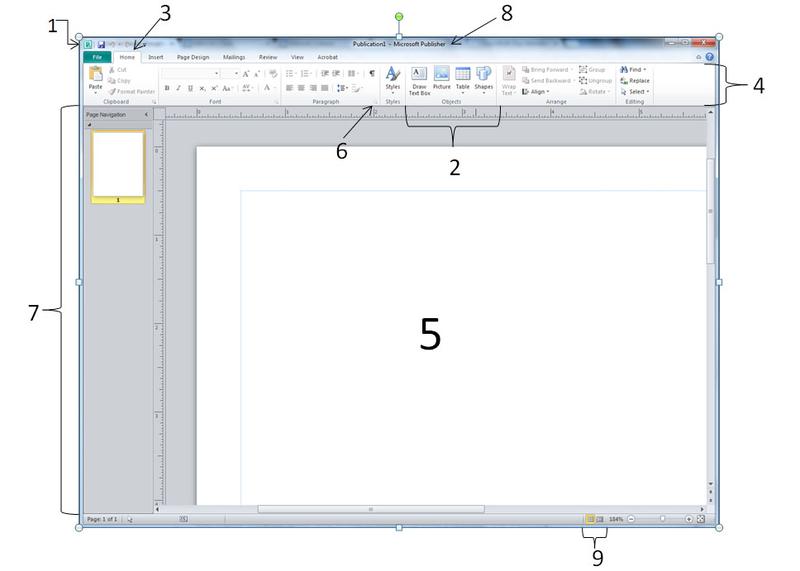 | quick access tool bar |
| Number 2, | group |
| Number 3, | tab |
| Number 4, | ribbon |
| Number 5, | workspace |
| Number 6, | access dialog box |
| Number 7, | page navigation pane |
| Number 8, | title bar |



