| A | B |
|---|
What location is open?, 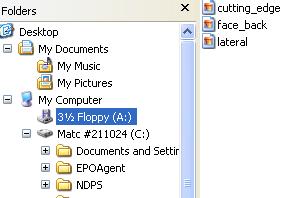 | Floppy A: |
| Can I copy the file "lateral" to Floppy A:?, | No, you're viewing Floppy A:, you can't copy it on top of itself, you have to copy it somewhere else. |
| What does the + (plus sign) mean next to the NDPS folder?, | This folder is collapsed. There are folders inside it and they are not currently viewed. |
| Is the MY DOCUMENTS folder expanded?, | YES. The "-" means it's expanded. |
| What is the NAME of the "-" (minus sign) next to MY COMPUTER., | COLLAPSE |
| Can you copy "lateral" into the My Pictures folder?, | Yes, you can see the file on the right. You can see the folder where it's going on the left. Just drag it on top of the folder using the right mouse button. |
| How many folders are inside the EPOAgent folder?, | You can't tell from this view, the folder isn't expanded. |
Which location is expanded?, 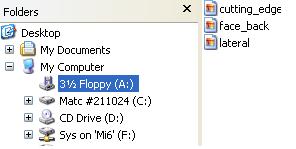 | MY Computer |
| Can you copy "face_back" into the My Documents folder?, | Yes. The file is shown on the right, the folder is shown on the left. |
| Can you copy "face_back" into the My Pictures folder?, | No, the My Pictures folder is not visible, it's inside the My Documents folder. |
| The "+" name is?, | The name is Expand. When you see the "+" it means that when you click it, it will expand. When you see a "+" it means the folders are collapsed inside of it. You "expand" to view the folders inside. |
| Can you copy "lateral" to a folder inside "CD Drive (D:)" location?, | No, you cannot see the folder. |
What does it mean to search "All of part of the filename?", 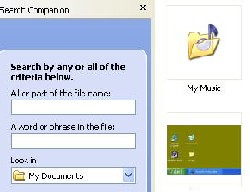 | You are searching based upon the name of the file only. |
| Are you searching inside Floppy A:?, | No, the MY DOCUMENTS location is active, not Floppy A:. |
| To change the location you're searching you would click where?, | on the drop down arrow next to the MY Documents text. Then scroll up or down to see Floppy A: and click on the Floppy A: choice. |
| How do I exit the search companion?, | One way is to click the X in the top of this picture; a second way is to click the Search button in the toolbar. |
| Searching "a word or phrase in the file" means?, | You are looking inside the document at the words, you are NOT searching the name of the document. |



