 |
|
|
CFF End of the Year Checkout
DO NOT FILL THIS OUT UNTIL YOU ARE READY TO LOCK UP YOUR EQUIPMENT AND BE CHECKED OUT BY YOUR PRINCIPAL/COACH.
Please provide us with the correct information/data so we can continue to maintain the equipment. If you need help with any of the equipment or during the checkout process, please contact your CFF coach. Thank you!
|
|
|
- Where do you teach?*
|
- Are you returning to CB next year?*
|
- If you are returning, are you staying at your current school?*
|
- What room # is the board/equipment in that you are closing/checking out?*
|
- How many Promethean Pens do you have that work?! *
|
- Please store your pens in the lockable cabinet of your black cart.
*
|
- Please store your bluetooth device (for the board) with your pens in the lockable cabinet of your black cart.*
|
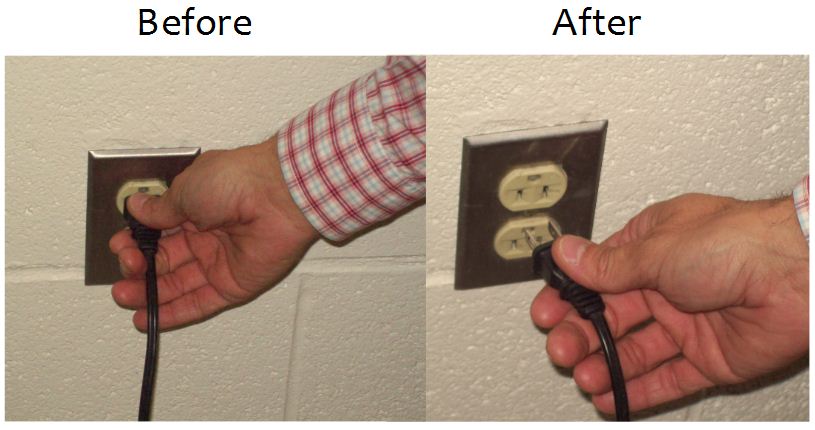
- Please unplug the black Promethean cord from the electrical socket. DO NOT attempt to take the cord out of the back of the board. If you need assistance, please contact your CFF coach.
 * *
|
- Please unplug the USB cord from your laptop (for most of you it is white, unless you have the longer black one).
 * *
|
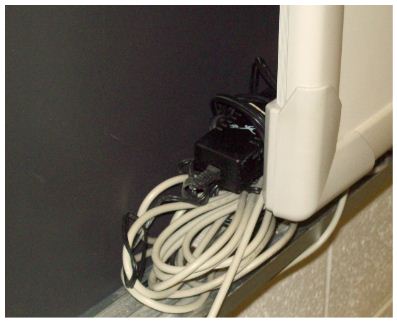
- Wrap the Promethean power and USB cords neatly and place them behind the board.
 * *
|
- Please clean out your filter for your projector. (Damp cloth and gently remove the dust)
 * *
|
- Please unplug the projector cords, close the lens cover (if applicable), and place your projector and cords in your lockable black cart. If your projector is mounted, please unplug the cords and place a bag over the projector to help control the dust (ask your CFF coach for help if necessary) .*
|
- Please place your projector remote in your lockable black cart.*
|
- Please place your digital camera in the lockable cabinet of your black cart.*
|
- Please place your web camera in the lockable cabinet of your black cart.*
|
- Please unplug your speakers and place them in the lockable cabinet of your black cart.*
|
- Where will your lockable black cart be stored for the summer? (Room #, pod, department storage closet, etc). MAKE SURE TO PUT YOUR NAME/ROOM # ON IT! Please note: if you took off your wheels, we suggest putting them back on to ensure the equipment will not be damaged when items are moved from your room for cleaning.*
|
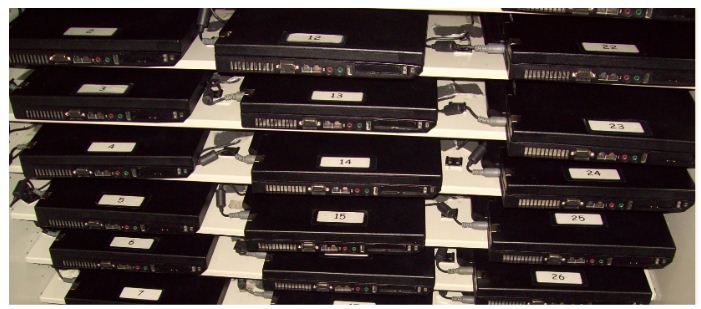
- Please make sure your student laptop cart is orderly (see below), unplug the cart from the electrical socket, and DO NOT TAKE OUT THE BATTERIES.
 * *
|
- All the locks for student laptop carts will be cut if IT cannot get into the cart. Please provide your combination if you have a student laptop cart.*
|
- How many charge cords (in your student laptop cart) are frayed/exposed and need to be replaced?*
|
- This is just a reminder that you have to turn in your laptop form and laptop (if applicable). *
|
- Lastly, please list equipment that is damaged or broken. Thank you for your help!*
|
- Please send an email to the CFF coach saying that your checklist is complete and you are ready to check out.*
|